Agentic SEO

SEO Agent

Content · Research · Technical SEO — automated end to end

One agent handles the full SEO stack: writes and publishes articles across platforms, surfaces keyword gaps via SEMrush & Ahrefs, and opens code PRs for technical fixes — all triggered from a Google Sheet.

~177h
saved per month (60 articles)
10–20min
per article (vs 2.5–4h manual)
<1K
lines of custom code
Scroll to explore
The Problem

Writing one SEO post takes 2.5–4 hours of manual, repetitive work

#Manual StepEst. Time
1SERP Research — read top 5 competitor pages30–45 min
2Outline — build H1/H2 from SERP analysis15–20 min
3Write 900–1,400 word HTML, brand voice60–90 min
4Internal Review — business + campaign fit20–30 min
5Choose Images — Unsplash, check relevance15–20 min
6Create Thumbnail — design card image10–15 min
7Upload to Webflow CMS — metadata + assets15–20 min
8Update Tracking — write status + URL to Sheet5–10 min
Total per article~2.5–4 hrs

Time per step (minutes, average)

The Solution

No one needs to watch — trigger manually or let the schedule run it

🖱️
Manual Trigger
1 click in Google Sheets menu
or
Auto Schedule
7 am · 12 pm · 8 pm — every day
team only maintains keyword backlog
↓ calls
⚙️
Apps Script
finds next pending keyword, builds prompt
🖥️
Express Server
job queue · max 2 parallel
↓ spawns
🤖 Claude Code Agent isolated workspace · 20 min timeout per article
1
Research
SerpApi + Playwright
2
Outline
gap analysis → H2s
3
Write HTML
800–1,400 words
4
Self-review
brand + campaign QA
5
Thumbnail
HTML → screenshot
6
Images
Unsplash + AI vision
7
Publish
Webflow Draft
↑ Hover over a step to see what the agent does
↓ notifies
🌐 Webflow Draft ready
💬 Discord thread updated
📊 Google Sheets updated
⏱ 10–20 minutes · Zero human attention required
Prompt Engineering

Google Sheets as configuration — XML as the language Claude understands

Four sheets feed every article

SheetWhat it providesWho edits it
Keywords Target keyword · search volume · intent · Prompt ID reference Content team
Prompts Instruction templates with {{keyword}} placeholder — one per content type Content lead
Business Input Company context, brand voice, products, campaign goals, site identifier Marketing lead
Internal Links URL + anchor text pairs the agent must weave into every article SEO team
buildPromptContent() reads all four sheets and assembles a single XML payload — no hardcoded content anywhere.
Why XML, not plain text?

Plain text blurs boundaries — Claude can't tell where business context ends and instructions begin. With explicit XML tags, each section is unambiguous: the agent can reference <Context> when checking brand voice, <InternalLinks> when placing links, and treat <PrimaryPrompt> as the task definition. Mixing these would degrade output quality.

What Claude receives per article

<Context> JourneyHorizon is an HR software company targeting SMBs in Southeast Asia. Brand voice: practical, direct, no jargon. Current campaign: Q2 hiring-season push... </Context> <InternalLinks> <link> <url>https://journeyhorizon.com/payroll</url> <anchor>payroll software for startups</anchor> </link> ... more links from sheet </InternalLinks> <PrimaryPrompt> Write a comprehensive SEO blog post about {{keyword}} following these guidelines: - H2 structure based on SERP gap analysis - 800–1,400 words, semantic HTML - Weave in all internal links naturally - Match brand voice from Context above - Include FAQ section... </PrimaryPrompt>
Architecture

The secret isn't knowing what to build — it's knowing what not to build

📊
Google Sheets + Apps Script
UI · Database · Scheduler · Access control — already solved
Without it: Build a custom dashboard, a database, a cron scheduler, and an API endpoint — months of work.
What we get: Content team runs the entire pipeline from a spreadsheet they already know. Real-time collaboration, revision history, and access control — built-in.
Bonus: Apps Script acts as both the UI and a public webhook endpoint. No separate API server needed for callbacks.
💬
Discord + Webhooks
Notifications · Thread management · Team comms — already solved
Without it: Build a monitoring dashboard, a notification service, retry logic for delivery, and a team alert system.
What we get: Each article gets its own Discord thread. Team sees live progress — "Research done → Writing done → Published" — without checking any dashboard.
Bonus: Errors are posted to the same thread, so the context of failure is always visible alongside the job that failed.
🤖
Claude Code CLI
AI reasoning · Multi-step planning · Tool use · Error recovery — already solved
Without it: Build an LLM orchestration layer, an agent framework, tool execution engine, and manage context across steps.
What we get: The "employee" that researches, writes, reviews, and publishes — autonomously, in its own workspace, with access to web browsing, file I/O, and bash scripts.
Bonus: CLAUDE.md acts as the job description. Changing how the agent behaves only requires editing one markdown file — no code deployment.
What we actually wrote
📄
Prompts (CLAUDE.md)
The job description for the agent — step-by-step workflow, brand rules, output format
🔌
MCP Connectors
Wires Claude to SerpApi, Playwright, and Unsplash — three tools it uses to research and source images
⚙️
Bash Scripts
Concrete actions: validate-and-upload-image.sh, render-thumbnail.js, publish-to-webflow.sh
Total custom code across all three: under 1,000 lines. Complex workflow. Minimal code.
Impact

From 180 hours to 3 hours of human time — per month

ManualWith Agent
Time per article 2.5–4 hours 3 min + 15 min wait
Human attention Continuous 1 click only
Scheduling Manual, ad-hoc Automatic 3× daily
Parallel articles 1 per writer 2 simultaneously
Consistency Writer-dependent Same voice, every time
Status tracking Manual updates Auto: URL + images + status
~177h
saved per month at 60 articles/month (3/day)
≈ 4+ weeks of full-time work freed every single month

Hours per month — 60 articles (3/day)

Output Quality

Every article is complete — ready for one-click publish
📝
HTML Content
800–1,400 words, proper H2 structure, internal links, external references
🏷️
Meta Tags
Title 50–60 chars + description 150–160 chars, SEO-optimized
🔗
SEO Slug
Clean, keyword-rich URL slug — ready for Webflow
🖼️
AI-Validated Images
Hero + 3 section images — Claude Haiku vision validates relevance before upload
🎨
Branded Thumbnail
925×600px — rendered from brand HTML template via Playwright screenshot
Self-Reviewed
Agent runs its own QA: business context, campaign alignment, FAQ structure
🚀
Webflow Draft
CMS item created in draft — editor reviews then publishes
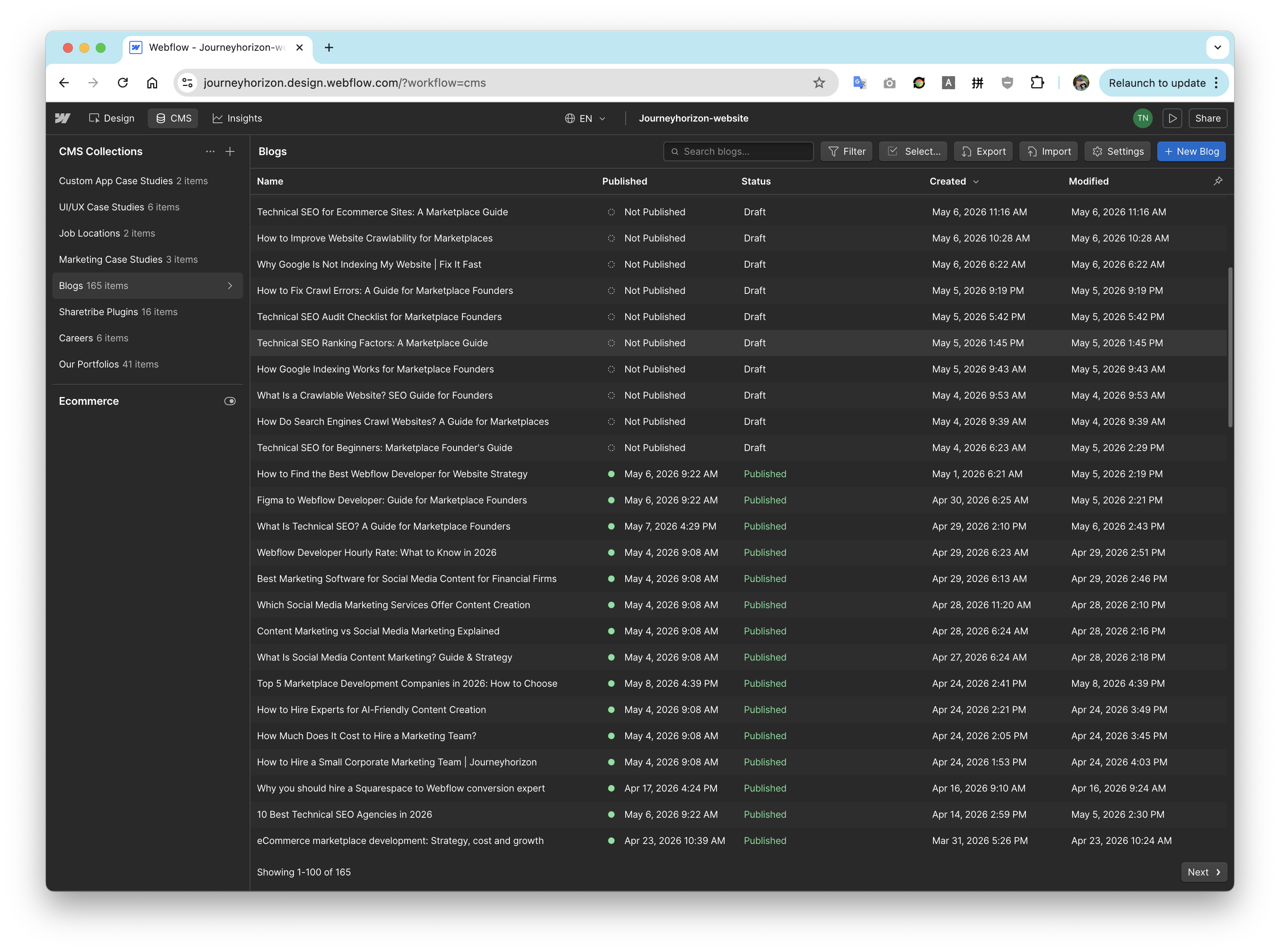
Webflow CMS showing 165+ blog posts created by the agent
Webflow CMS 165+ articles — all created by the agent as Webflow Drafts
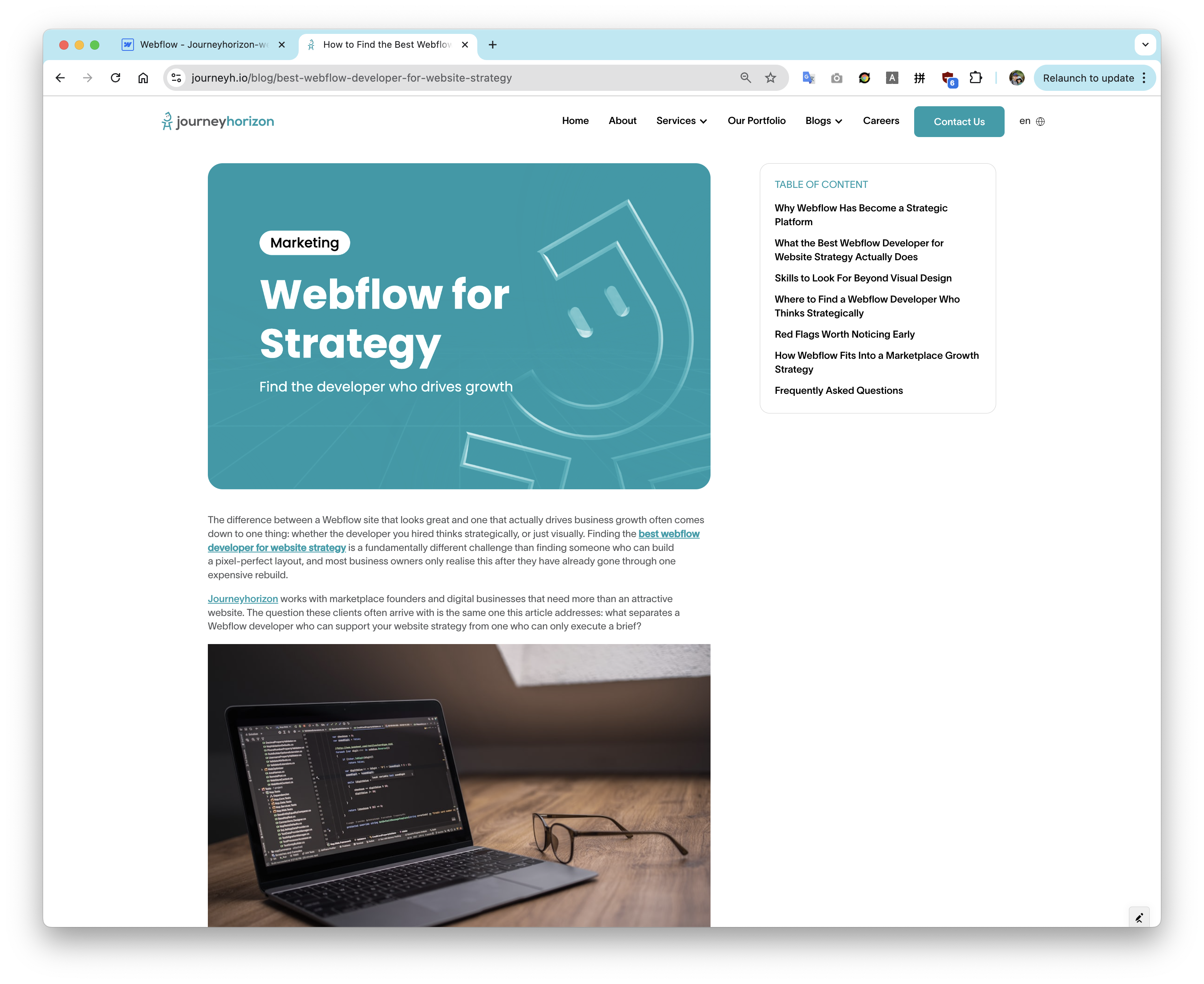
Published article with branded thumbnail and AI-selected images
Real output Branded thumbnail + AI-validated section images, auto-inserted
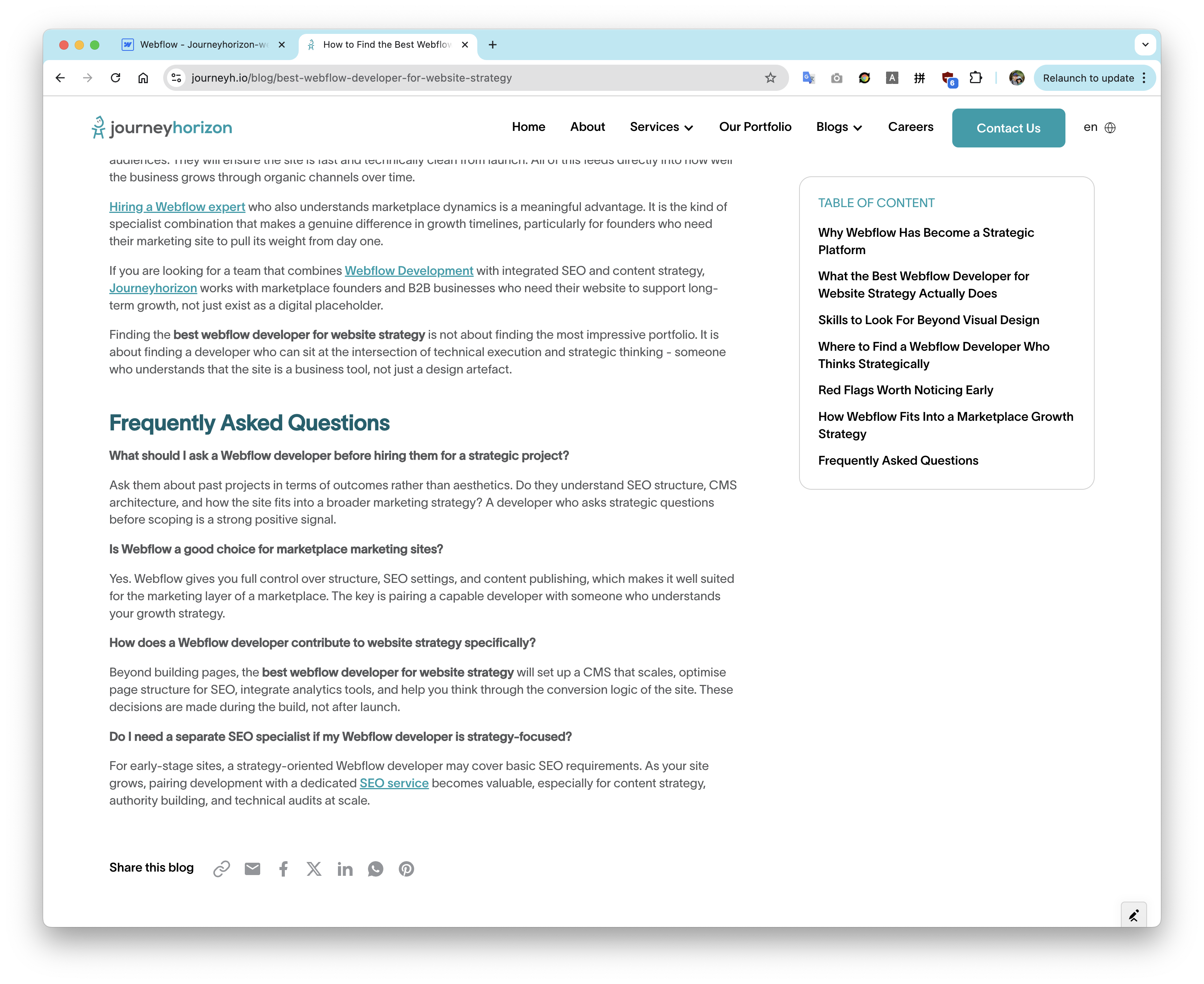
Article with FAQ section and natural internal links
Content quality FAQ section + natural internal backlink placement
Extensibility

Publish anywhere — the agent output is platform-agnostic

Agent always outputs the same JSON format

{ "slug": "seo-guide-for-saas-founders", "meta_title": "SEO Guide for SaaS Founders...", "meta_description": "Learn how to...", "content_html": "<h2>Why SEO Matters...</h2>", "hero_image_url": "https://assets.webflow.com/...", "section_images": ["https://...", "https://..."], "thumbnail_url": "https://assets.webflow.com/..." }
Adding a new publishing target takes 3 things
1 Add an entry to config/sites.js — API endpoint + field mapping for that platform
2 Set 4 env variables — API key, site/collection ID, webhook secret
3 Write publish-to-{platform}.sh — ~30 lines of curl calls against the platform API

Supported publishing targets

🌐
Webflow CMS
CMS REST API
✓ Current
🛒
Shopify
Admin API / Blogs
+ Config
📰
WordPress
REST API + JWT
+ Config
👻
Ghost
Admin API
+ Config
📦
Contentful
Content Mgmt API
+ Config
🔌
Custom Endpoint
Any REST API
+ Script
The pipeline core — research, write, review, upload assets — never changes. Only the last step (publish script) is swapped per platform.
Extensibility

Beyond blog writing — a full SEO intelligence stack

🔍
SEO Intelligence MCPs
SEMrush · Ahrefs · Google Search Console
Keyword gap analysis: find topics competitors rank for that we don't
Site audit: broken links, crawl errors, thin content, duplicate titles
Rank tracking: which keywords dropped this week — trigger a content refresh
Search Console: prioritize keywords with high impressions but low CTR
Backlink gap: which domains link to competitors but not to us
Articles are now chosen by ROI — traffic opportunity × competition difficulty — not intuition.
⚙️
Technical SEO via GitHub
GitHub MCP + bash scripts → auto PRs
Reads the entire codebase to understand current SEO implementation
Detects: missing JSON-LD schema, broken canonicals, absent hreflang
Opens PR: adds BlogPosting schema to all 165+ articles
Generates sitemap.xml from all published CMS entries automatically
Adds preconnect, lazy-load, font-display for Core Web Vitals
From blog creation to code commits — the same agent loop, a different output target.
🚀
Further Potentials
Anything reachable by API or CLI
📱Social posts — LinkedIn article + X thread auto-drafted from each blog
📧Newsletter — weekly digest compiled from the week's published articles
🌐Multi-language — /vi /ja /ko content variants via the same pipeline, translated
🔄Content refresh — detect articles older than 6 months, re-research SERP and rewrite
🔗Internal linking — scan all existing articles, find and fill missing link opportunities
Each extension = one new CLAUDE.md + one MCP + one bash script. Same architecture, infinite scope.
Roadmap

From blog automation to a full SEO operating system

Phase 1 ✓ Live
Blog Automation
  • Research → write → self-review → publish
  • AI image validation + brand thumbnail
  • Auto-schedule 3× daily, 2 parallel jobs
  • Multi-site: journeyhorizon + chimedeck
  • Discord thread + Sheets auto-update
Phase 2 Next
SEO Research & Multi-Platform
  • Publish to Shopify, WordPress, Ghost
  • SEMrush + Ahrefs MCP keyword intelligence
  • Search Console: impressions → CTR gap
  • Articles prioritized by traffic ROI
  • Backlink gap alerts vs. competitors
Phase 3 Planned
Technical SEO
  • GitHub MCP: read codebase, detect issues
  • Auto PRs: JSON-LD schema, canonicals
  • Sitemap.xml generated from CMS entries
  • Core Web Vitals: preconnect, lazy-load
  • Internal linking across all articles
Phase 4 Vision
Full SEO Autonomy
  • Content refresh: detect stale → rewrite
  • Multi-language: /vi /ja /ko auto-variants
  • Social: LinkedIn + X thread per article
  • Newsletter digest from weekly output
  • Autonomous loop: audit → fix → publish → monitor
Phase 1 works today. Each subsequent phase adds one new CLAUDE.md + one MCP + one bash script — the architecture never changes.
FAQ

Common questions

How much does it cost per article?
Roughly $0.30–$0.80 in API costs (Claude tokens for research + writing + self-review, SerpApi for SERP data). Unsplash free tier covers ~16 articles/hour. Webflow API is free.
Does content need heavy editing before publishing?
Light editing only. The self-review step handles brand alignment and campaign fit. Most articles need minor tweaks — a sentence or two — before they're publish-ready.
What happens if the agent fails or times out?
Every job has a 20-minute timeout. On failure: error is posted to the Discord thread, and the Sheets status rolls back so the keyword can be retried. No silent failures.
Can non-technical team members use it?
Yes — the only interface is Google Sheets. Content team fills in a keyword and clicks a menu item. No code access, no server, no new tools to learn.
How is brand voice kept consistent across articles?
The Business Input sheet holds the brand brief. Every article receives the same <Context> XML block — voice, tone, campaign focus, positioning. The agent cannot deviate from it.
How long to set up for a new website?
About 2 hours. Add a config entry in sites.js, write a CLAUDE.md brand template, set 4 env variables (API key, site ID, collection ID, webhook secret), and run one test article end-to-end.